 Unstuck
Any browser
Anything Chromium you can reach over CDP works: a Chrome started with --remote-debugging-port, a hosted browser (Browserbase, Steel and others give you a CDP or WebSocket URL), or the browser inside another framework. Connect Playwright to it and take over the agent's tab. Nothing is launched or closed.
npm init -y && npm pkg set type=module
npm install @velmlabs/unstuck playwright// Attach to the running browser; nothing is launched or closed.
const browser = await chromium.connectOverCDP(process.env.CDP_URL ?? 'http://127.0.0.1:9222');
const page = await agentPage(browser, process.env.AGENT_URL_PART);
console.log('Taking over', page.url());
const unstuck = new Unstuck({
onLink: ({ url, reason }) => console.log(`\n${reason}. Open this link:\n${url}\n`),
});
const result = await unstuck.takeover(page, { reason: 'Please solve this step', timeoutS: 300 });
console.log(`Takeover ${result.status} after ${result.durationS}s`);Pick the right tab
A connected browser can have several tabs. agentPage only considers web pages (never a blank or chrome:// tab). With AGENT_URL_PART it takes the tab whose URL contains it, and stops with an error if none does; without it, it takes a web page. When several tabs are open, set AGENT_URL_PART (for example /checkout), or pass the page you already have.
import type { Browser, Page } from 'playwright';
/**
* The tab your agent is working in, in a browser you connected to over CDP.
* Only web pages (http/https) count, never a blank or chrome:// tab. With `urlPart` (pass it when several tabs are open),
* the tab whose URL contains it, or an error if none does; without it, a web page.
*/
export async function agentPage(browser: Browser, urlPart?: string): Promise<Page> {
const web = browser.contexts().flatMap((c) => c.pages()).filter((p) => /^https?:/.test(p.url()));
if (urlPart) {
const match = web.filter((p) => p.url().includes(urlPart)).at(-1);
if (!match) throw new Error(`no open tab matches "${urlPart}"`);
return match;
}
const page = web.at(-1);
if (!page) throw new Error('no page to take over');
return page;
}What the person sees
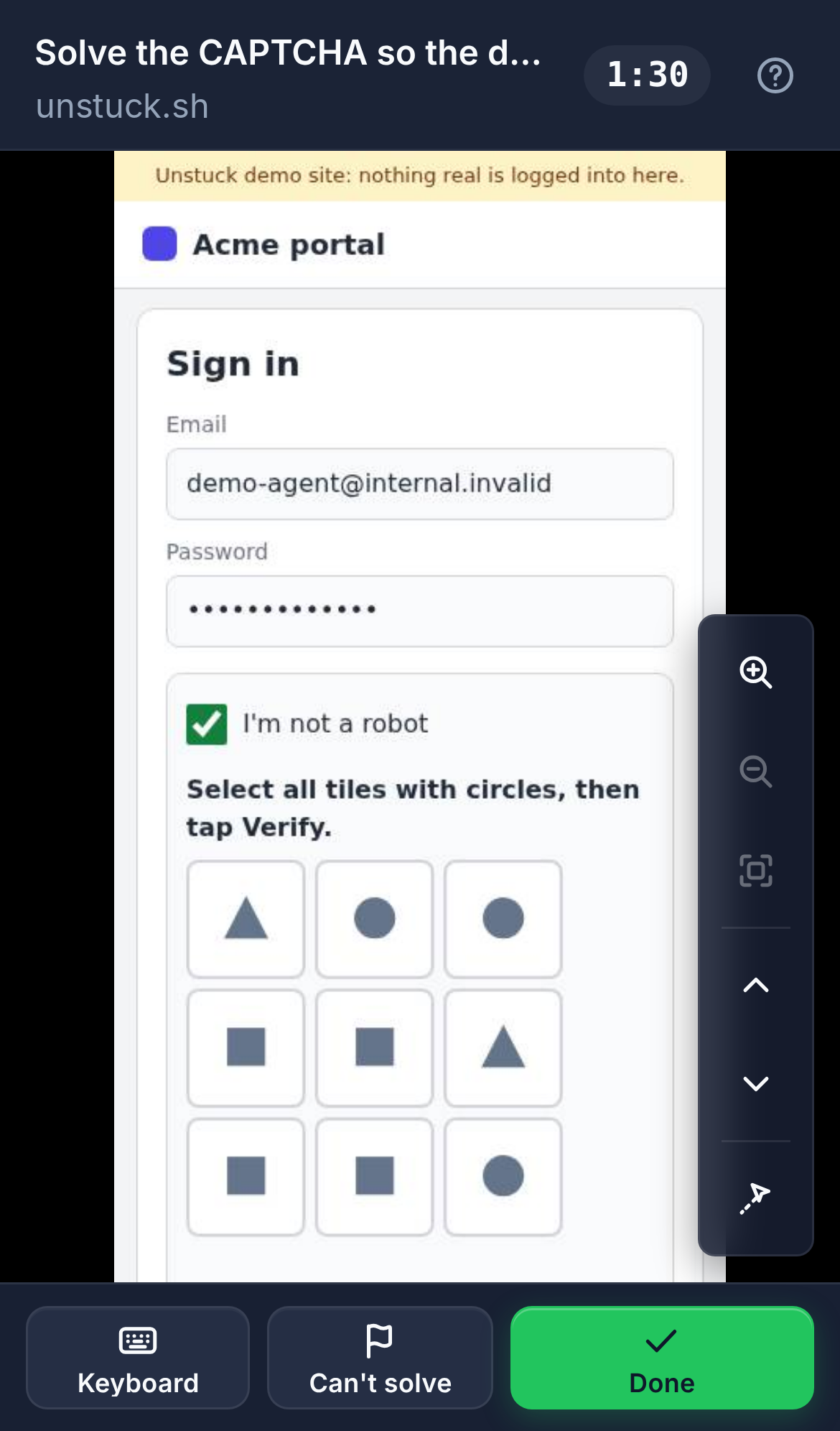
They open the link and see your agent's live page: on this machine by default, or on any phone with Unstuck Cloud. They tap and type straight into it (a Keyboard button opens the phone keyboard), then tap Done. If they can't, Can't solve hands it back with a reason.
Selenium
Start Chrome through Selenium with a debugging port, then let Unstuck attach to the same tab when your script is stuck:
pip install unstuck playwright selenium# Selenium's Chrome was started with --remote-debugging-port, so Playwright can attach to the same tab.
async with async_playwright() as p:
browser = await p.chromium.connect_over_cdp(f"http://127.0.0.1:{DEBUG_PORT}")
page = next((pg for ctx in browser.contexts for pg in ctx.pages if pg.url == driver.current_url), None)
if page is None:
raise RuntimeError(f"No tab is on {driver.current_url}; is another Chrome using port {DEBUG_PORT}? Set DEBUG_PORT.")
def on_link(link):
print(f"\n{link.reason}. Open this link:\n{link.url}\n", flush=True)
async with Unstuck(on_link=on_link) as unstuck:
result = await unstuck.takeover(page, reason=reason, timeout_s=300)
print(f"Takeover {result.status} after {result.duration_s}s", flush=True)
return result.statusOn a server or in CI
There's no screen and no one nearby, so send the link through Unstuck Cloud: set UNSTUCK_API_KEY=uk_live_… from your dashboard and deliver the link however your team works (a Slack message, an email, a ticket). The person opens it on their phone.
The complete CDP file
// Unstuck + any Chromium you can reach over CDP: a hosted browser (Browserbase, Steel, …), a Chrome started
// with --remote-debugging-port, or the browser inside another framework. Unstuck takes over the agent's tab.
//
// npm init -y && npm pkg set type=module
// npm install @velmlabs/unstuck playwright
// CDP_URL=http://127.0.0.1:9222 AGENT_URL_PART=/checkout npx tsx index.ts
//
// On a server or in CI, add UNSTUCK_API_KEY=uk_live_… so the link goes through Unstuck Cloud and opens anywhere.
import { chromium } from 'playwright';
import { Unstuck } from '@velmlabs/unstuck';
import { agentPage } from './agent-page';
// #region snippet
// Attach to the running browser; nothing is launched or closed.
const browser = await chromium.connectOverCDP(process.env.CDP_URL ?? 'http://127.0.0.1:9222');
const page = await agentPage(browser, process.env.AGENT_URL_PART);
console.log('Taking over', page.url());

const unstuck = new Unstuck({
  onLink: ({ url, reason }) => console.log(`\n${reason}. Open this link:\n${url}\n`),
});
const result = await unstuck.takeover(page, { reason: 'Please solve this step', timeoutS: 300 });
console.log(`Takeover ${result.status} after ${result.durationS}s`);
// #endregion snippet
await unstuck.close();
process.exit(0); // the browser isn't ours to close: just let go of itThe complete Selenium file
"""Unstuck + Selenium: Selenium drives Chrome; when it gets stuck, Unstuck takes over the same tab over CDP.
pip install -r requirements.txt
python main.py [url]
Add UNSTUCK_API_KEY=uk_live_... to your environment to send the link through Unstuck Cloud.
"""
import asyncio
import os
import sys
from playwright.async_api import async_playwright
from selenium import webdriver
from unstuck import Unstuck
DEBUG_PORT = int(os.environ.get("DEBUG_PORT", "9223"))
async def ask_a_human(driver: webdriver.Chrome, reason: str) -> str:
# region snippet
# Selenium's Chrome was started with --remote-debugging-port, so Playwright can attach to the same tab.
async with async_playwright() as p:
    browser = await p.chromium.connect_over_cdp(f"http://127.0.0.1:{DEBUG_PORT}")
    page = next((pg for ctx in browser.contexts for pg in ctx.pages if pg.url == driver.current_url), None)
    if page is None:
        raise RuntimeError(f"No tab is on {driver.current_url}; is another Chrome using port {DEBUG_PORT}? Set DEBUG_PORT.")

    def on_link(link):
        print(f"\n{link.reason}. Open this link:\n{link.url}\n", flush=True)

    async with Unstuck(on_link=on_link) as unstuck:
        result = await unstuck.takeover(page, reason=reason, timeout_s=300)
    print(f"Takeover {result.status} after {result.duration_s}s", flush=True)
    return result.status
# endregion snippet
def main(url: str) -> None:
options = webdriver.ChromeOptions()
options.add_argument(f"--remote-debugging-port={DEBUG_PORT}")
driver = webdriver.Chrome(options=options)
try:
driver.get(url)
# ...your Selenium steps, until a CAPTCHA or a login stops them:
if asyncio.run(ask_a_human(driver, "Please solve the CAPTCHA")) == "resolved":
print("Selenium carries on at", driver.current_url, flush=True)
finally:
driver.quit()
if __name__ == "__main__":
main(sys.argv[1] if len(sys.argv) > 1 else "https://www.google.com/recaptcha/api2/demo")