 Unstuck
Quickstart
A first takeover in two minutes, with Playwright and TypeScript.
1. Install
In a new folder (the example uses top-level await, so the folder is set up for ES modules):
npm init -y && npm pkg set type=module
npm install @velmlabs/unstuck playwright
npx playwright install chromium
2. Add one call where your agent gets stuck
const unstuck = new Unstuck({
  onLink: ({ url, reason }) => console.log(`\n${reason}. Open this link:\n${url}\n`),
});

// The agent waits here while a person solves the page in the real browser.
const result = await unstuck.takeover(page, { reason: 'Please solve the CAPTCHA', timeoutS: 300 });
console.log(`Takeover ${result.status} after ${result.durationS}s`);

if (result.status === 'resolved') {
  // ...carry on with the agent's work here.
}
takeover() waits until the person is done, then returns. Your agent carries on in the same page.
On Cloudflare Workers? See Cloudflare Workers.
3. Run it
npx tsx index.tsOpen the printed link in a browser on the same machine, solve the page, tap Done. To open it on your phone instead, see Send the link anywhere.
Want Unstuck to notice the CAPTCHA by itself, without the takeover() call? Wrap the page once with unstuck.wrap(page): see Unstuck Browser.
What the person sees
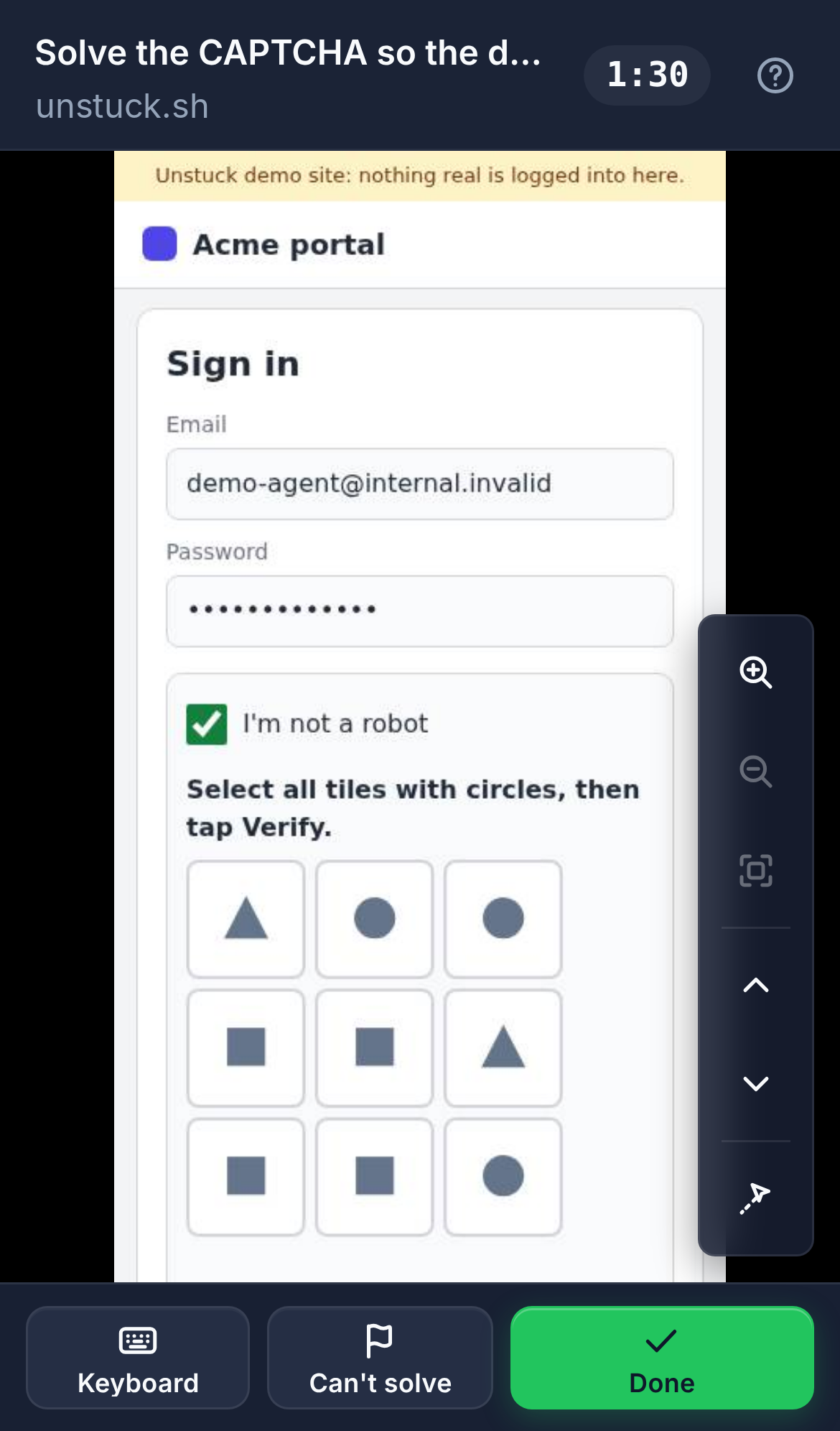
They open the link and see your agent's live page: on this machine by default, or on any phone with Unstuck Cloud. They tap and type straight into it (a Keyboard button opens the phone keyboard), then tap Done. If they can't, Can't solve hands it back with a reason.
Send the link anywhere
By default the link only opens on the machine your agent runs on. To open it on any phone, from anywhere, create an API key in your dashboard and set it:
export UNSTUCK_API_KEY=uk_live_…The link then goes through Unstuck Cloud. Nothing else changes in your code.
To get an alert when your agent is stuck, pair your phone in the dashboard and connect Telegram (recommended). See Phone alerts.
Options
| Option | TypeScript | Python | Default |
|---|---|---|---|
| Why you need help (shown to the person) | reason |
reason |
required |
| How long to wait | timeoutS |
timeout_s |
600 seconds |
A 6-digit code that comes with the link, so a forwarded link alone isn't enough. Needs an onLink handler that sends the code by a different channel than the link. |
requireCode: true |
require_code=True |
off |
| Other sites the person may open, e.g. a Google sign-in or a bank's 3-D Secure page | allowedSites: ['accounts.google.com'] |
allowed_sites=[...] |
none |
The person can only use the page you hand them. The tab stays on that page's site (example.com and its subdomains, plus any allowedSites), so the browser's other logins stay out of reach: links to other sites don't open, and a new tab on another site is closed before they see it.
Using Python?
pip install unstuck playwright
python -m playwright install chromiumdef on_link(link):
print(f"\n{link.reason}. Open this link:\n{link.url}\n", flush=True)
async with Unstuck(on_link=on_link) as unstuck:
# The agent waits here while a person solves the page in the real browser.
result = await unstuck.takeover(page, reason="Please solve the CAPTCHA", timeout_s=300)
print(f"Takeover {result.status} after {result.duration_s}s", flush=True)
if result.status == "resolved":
... # carry on with the agent's work hereThe complete TypeScript file
// Unstuck + Playwright: an agent opens a page, asks a human to take over, then carries on.
//
//   npm init -y && npm pkg set type=module
//   npm install @velmlabs/unstuck playwright
//   npx playwright install chromium
//   npx tsx index.ts [url]
//
// Add UNSTUCK_API_KEY=uk_live_… to your environment to send the link through Unstuck Cloud,
// so it opens on any phone, from anywhere.
import { chromium } from 'playwright';
import { Unstuck } from '@velmlabs/unstuck';

const browser = await chromium.launch();
const page = await browser.newPage();
await page.goto(process.argv[2] ?? 'https://www.google.com/recaptcha/api2/demo');

// #region snippet
const unstuck = new Unstuck({
  onLink: ({ url, reason }) => console.log(`\n${reason}. Open this link:\n${url}\n`),
});

// The agent waits here while a person solves the page in the real browser.
const result = await unstuck.takeover(page, { reason: 'Please solve the CAPTCHA', timeoutS: 300 });
console.log(`Takeover ${result.status} after ${result.durationS}s`);

if (result.status === 'resolved') {
  // ...carry on with the agent's work here.
}
// #endregion snippet

await unstuck.close();
await browser.close();