 Unstuck
Playwright
Pass Playwright's page to takeover(). Unstuck takes over that exact tab, including its popups, and gives it back when the person is done.
TypeScript
npm init -y && npm pkg set type=module
npm install @velmlabs/unstuck playwright
npx playwright install chromiumconst unstuck = new Unstuck({
onLink: ({ url, reason }) => console.log(`\n${reason}. Open this link:\n${url}\n`),
});
// The agent waits here while a person solves the page in the real browser.
const result = await unstuck.takeover(page, { reason: 'Please solve the CAPTCHA', timeoutS: 300 });
console.log(`Takeover ${result.status} after ${result.durationS}s`);
if (result.status === 'resolved') {
// ...carry on with the agent's work here.
}Python
pip install unstuck playwright
python -m playwright install chromiumdef on_link(link):
print(f"\n{link.reason}. Open this link:\n{link.url}\n", flush=True)
async with Unstuck(on_link=on_link) as unstuck:
# The agent waits here while a person solves the page in the real browser.
result = await unstuck.takeover(page, reason="Please solve the CAPTCHA", timeout_s=300)
print(f"Takeover {result.status} after {result.duration_s}s", flush=True)
if result.status == "resolved":
... # carry on with the agent's work hereThe Python SDK is async and has the same options: reason, timeout_s, require_code, allowed_sites.
Let Unstuck notice the check
Instead of calling takeover() where you expect a check, wrap the page once. Every goto, click and locator action that lands on a CAPTCHA brings a person in and returns once they're past it:
const unstuck = new Unstuck({
onLink: ({ url, reason }) => console.log(`\n${reason}. Open this link:\n${url}\n`),
});
const page = unstuck.wrap(await browser.newPage(), { remember: true });
try {
// A check on this page brings a person in; goto returns once they're past it.
await page.goto(process.argv[2] ?? 'https://www.google.com/recaptcha/api2/demo');
console.log(`Takeover ${page.unstuck.lastRescue?.status ?? 'not needed'}: now on "${await page.title()}"`);
// ...carry on with the agent's work here.
} catch (e) {
if (!(e instanceof UnstuckRescueError)) throw e;
console.log(`Takeover ${e.status}: ${e.message}`);
}Python works the same way with async Playwright (unstuck.wrap(page)). The details, including session memory and what happens when a rescue fails, are in Unstuck Browser.
What the person sees
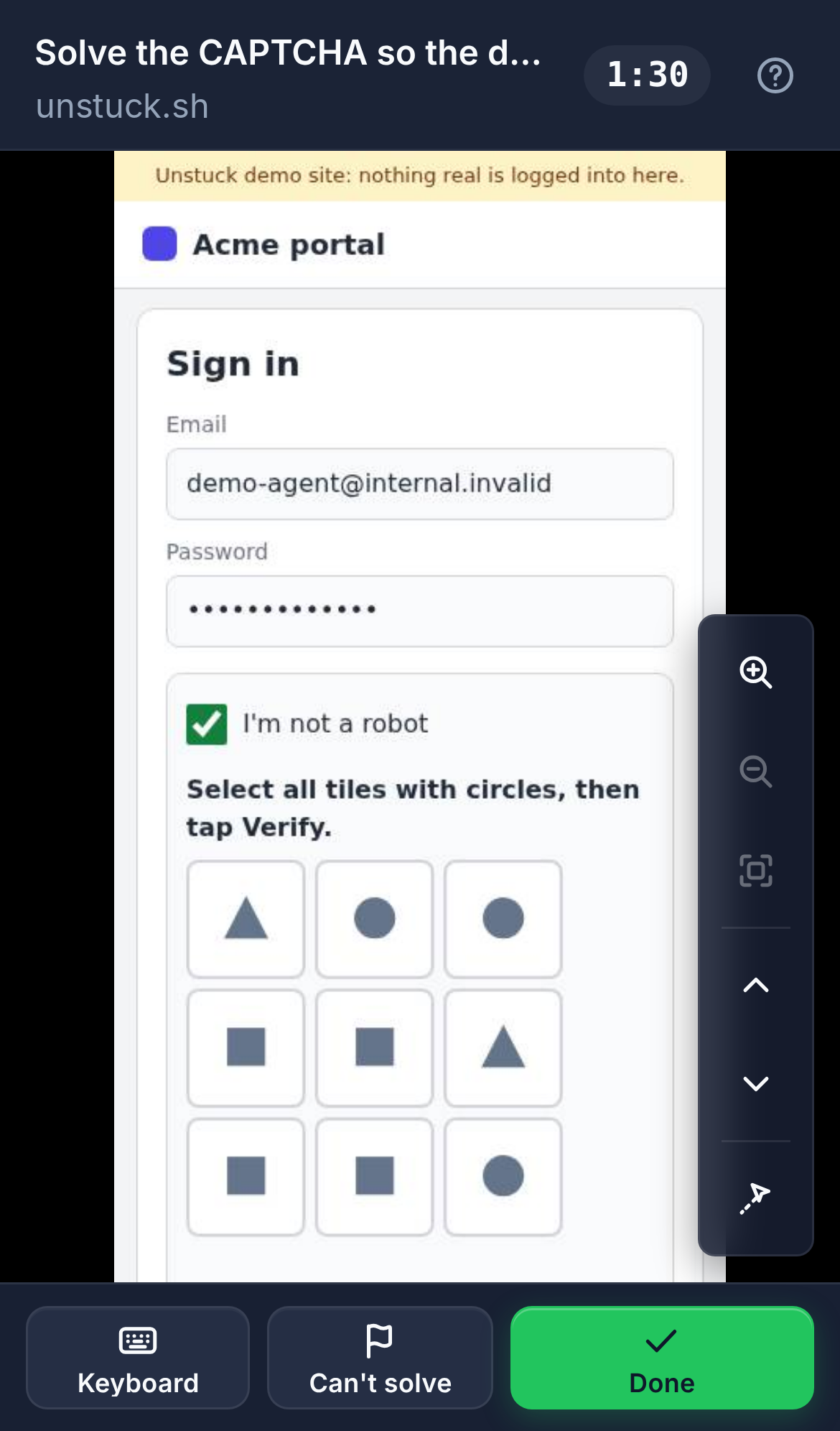
They open the link and see your agent's live page: on this machine by default, or on any phone with Unstuck Cloud. They tap and type straight into it (a Keyboard button opens the phone keyboard), then tap Done. If they can't, Can't solve hands it back with a reason.
Already connected to a browser?
If your Playwright code uses connectOverCDP (a hosted browser, a shared Chrome), see Any browser for picking the right tab.
The complete TypeScript file
// Unstuck + Playwright: an agent opens a page, asks a human to take over, then carries on.
//
// npm init -y && npm pkg set type=module
// npm install @velmlabs/unstuck playwright
// npx playwright install chromium
// npx tsx index.ts [url]
//
// Add UNSTUCK_API_KEY=uk_live_… to your environment to send the link through Unstuck Cloud,
// so it opens on any phone, from anywhere.
import { chromium } from 'playwright';
import { Unstuck } from '@velmlabs/unstuck';
const browser = await chromium.launch();
const page = await browser.newPage();
await page.goto(process.argv[2] ?? 'https://www.google.com/recaptcha/api2/demo');
// #region snippet
const unstuck = new Unstuck({
  onLink: ({ url, reason }) => console.log(`\n${reason}. Open this link:\n${url}\n`),
});

// The agent waits here while a person solves the page in the real browser.
const result = await unstuck.takeover(page, { reason: 'Please solve the CAPTCHA', timeoutS: 300 });
console.log(`Takeover ${result.status} after ${result.durationS}s`);

if (result.status === 'resolved') {
  // ...carry on with the agent's work here.
}
// #endregion snippet
await unstuck.close();
await browser.close();The complete Python file
"""Unstuck + Playwright for Python: an agent opens a page, asks a human to take over, then carries on.
pip install -r requirements.txt
python -m playwright install chromium
python main.py [url]
Add UNSTUCK_API_KEY=uk_live_... to your environment to send the link through Unstuck Cloud,
so it opens on any phone, from anywhere.
"""
import asyncio
import sys
from playwright.async_api import async_playwright
from unstuck import Unstuck
async def main(url: str) -> None:
async with async_playwright() as p:
browser = await p.chromium.launch()
page = await browser.new_page()
await page.goto(url)
# region snippet
def on_link(link):
    print(f"\n{link.reason}. Open this link:\n{link.url}\n", flush=True)

async with Unstuck(on_link=on_link) as unstuck:
    # The agent waits here while a person solves the page in the real browser.
    result = await unstuck.takeover(page, reason="Please solve the CAPTCHA", timeout_s=300)
print(f"Takeover {result.status} after {result.duration_s}s", flush=True)
if result.status == "resolved":
    ...  # carry on with the agent's work here
# endregion snippet
await browser.close()
if __name__ == "__main__":
asyncio.run(main(sys.argv[1] if len(sys.argv) > 1 else "https://www.google.com/recaptcha/api2/demo"))